Tamagotchi for Couples: Raise Your Shared Pet in Bunny
Choose Bunny for a Tamagotchi-style pet you and your partner can care for together. You share one bunny on both phones, with free basic care on iPhone and iPad.
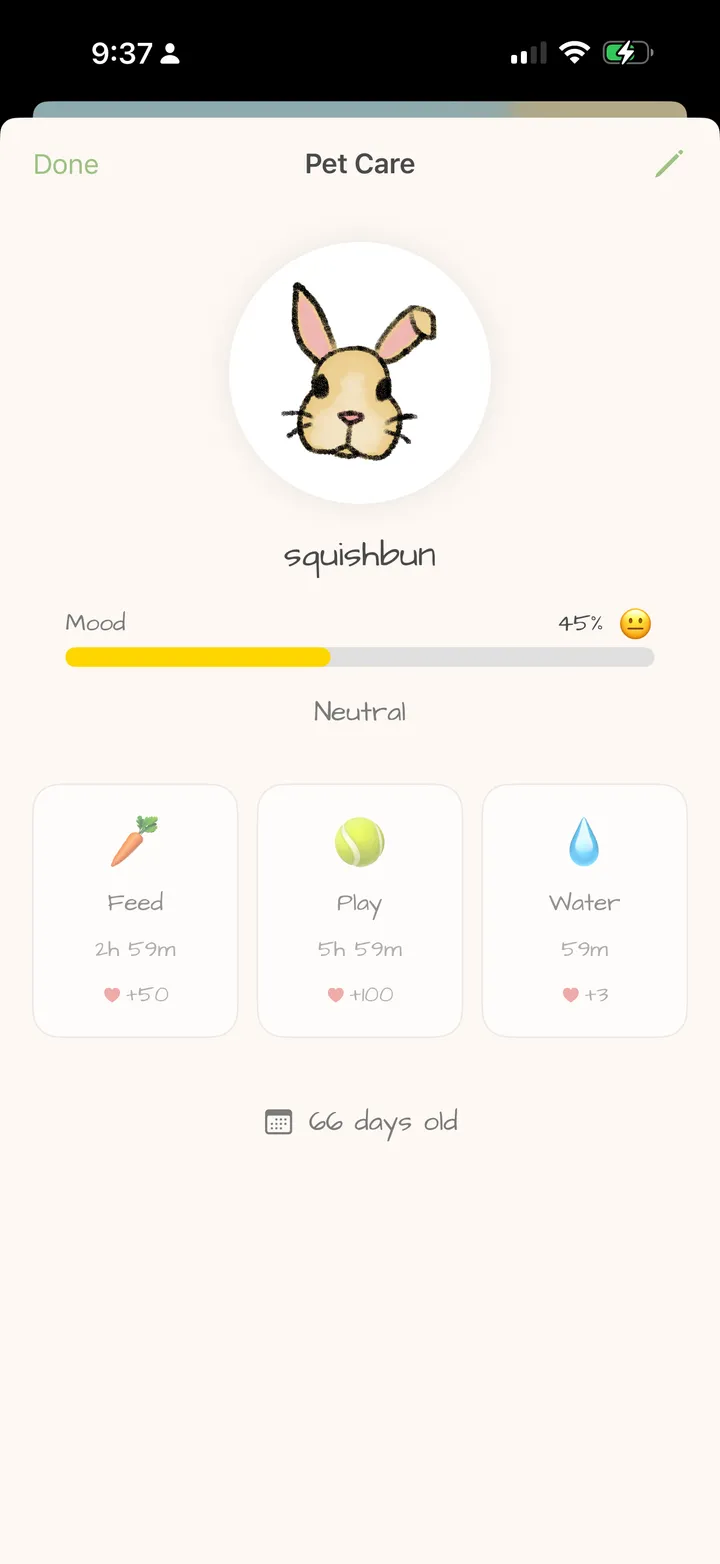
Give your bunny a name, feed it, play with it and check on its mood. You can also leave your partner a text love letter for free, or add to a shared drawing with Bunny Pro. It all lives in your little home for two.
Is there a Tamagotchi-style pet I can care for with my partner?
Yes. Bunny connects your two accounts to one pet. You both see its name, mood and care timers, and either of you can feed it, play with it or give it water when the action is ready. You can visit together or at different times.
Why choose Bunny for your shared pet?
- Care for the same bunny. Your actions affect the pet you both see, with a shared name, mood and timers.
- Start with care you can try free. Feed, Play and Water are included without a subscription.
- Leave something for each other. Send a text love letter for free, or use the shared drawing canvas with Pro.
- Choose how you upgrade. Pro offers both a weekly subscription and a one-time lifetime purchase.
What you can do with your bunny today
- Install and connect. Download Bunny on both devices and create an account each. One partner creates a Love Nest and shares the invite code; the other joins using that code.
- Name your bunny. Open your shared pet and choose a name. You both care for this bunny from your own accounts.
- Check what’s ready. Choose an available Feed, Play or Water action. Each has its own cooldown, shared by both partners.
- Come back and check in. Your partner can open Bunny later with an internet connection to load the pet’s updated mood and timers, then choose an available action.
For example, if one of you feeds the bunny, the other will see Feed on cooldown too. Play or Water may still be ready. You don’t each get a separate feeding timer.
Bunny’s pet care is simple: three actions, a mood to check and shared timers. Either partner can do the available actions, so you can check in whenever you have a moment. See the shared-pet setup and FAQ for more about care and supported devices.
Beyond the pet, you can send text love letters free. With Pro, you can add to the same drawing canvas and display it in a Home Screen widget. The canvas is a shared drawing you can change, while the mailbox keeps your text letters.
Start with the free pet; choose Pro if you want more
You can try caring for your bunny and sending text letters without subscribing. If the shared whiteboard is something you both want, Pro has a weekly option and a one-time lifetime option. See what’s free and what Pro adds before deciding.
If you want a couples app without another required subscription, see what you can do in Bunny for free and when to choose lifetime Pro.
A little app that started as a present
Prafull built Bunny as a present for his girlfriend, then opened it up for other couples. Read the story or send him feedback.
Name your bunny together
Install Bunny on both devices. One of you creates a Love Nest and shares its invite code; the other joins. Then open your shared pet and give it a name.
Basic care is free. iPhone and iPad. English interface.
Frequently asked questions
Is there a Tamagotchi-style pet I can care for with my partner?
Yes. Choose Bunny to care for one shared pet on iPhone and iPad. Connect your accounts with a Love Nest invite code, name your bunny and start with free Feed, Play and Water actions. You share its name, mood and care timers. An internet connection is needed to share updates.
What happens if my partner feeds our bunny first?
Feed, Play and Water have separate cooldowns shared by both partners. If your partner has already fed the bunny, Feed will be on cooldown for you too. Open Bunny to check whether Play or Water is ready, or return when the Feed timer has finished.
Do we have to buy a subscription to start?
No. Basic bunny care and text love letters are free. The shared whiteboard requires Bunny Pro, available through a weekly subscription or a one-time lifetime purchase.
Can we use Bunny if one of us has Android?
Bunny currently supports iPhone and iPad, so both partners need a supported Apple device. There is no Android version currently.
Is Bunny an official Tamagotchi app?
No. Bunny is an independent couples app, not affiliated with Tamagotchi or Bandai. It offers a bunny you can feed, play with and give water to together.
Try together in Bunny: Raise a shared pet · Draw together · Send love notes
By Prafull Sharma · About Bunny · Free and Pro features